The first time I ordered a latte at 135°F, the barista punched it in as “kids temp” without asking me anything further, and the drink came out at what I’d conservatively estimate was 150°F. Not their fault. “Kids temp” is a standard meant to be 130°F, but in practice it can mean different things to different people on the floor, and on a Tuesday morning with a 40-drink queue stacked up, there’s no room for temperature philosophy.
I’ve been ordering customized-temperature drinks consistently since 2022, and the 130°F–140°F range specifically is the one that causes the most confusion—not the 180°F extra-hot requests, not the room-temp cold foam stuff. It’s the middle range that falls between the internal shorthands baristas actually use.
Why This Temperature Range Is Specifically Tricky
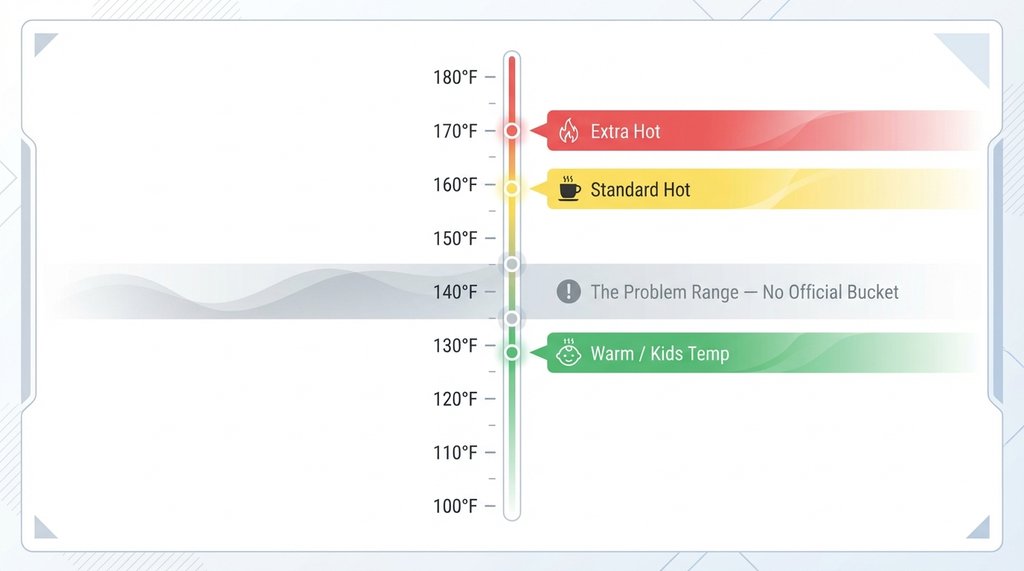
Starbucks trains to specific anchor points: “warm” or “kids temperature” (130°F), “hot” (standard, which is typically 160°F), and “extra hot” (170°F). The in-app selector shows “Warm,” “Hot,” and “Extra Hot” as the three buckets. What that means operationally is that if you ask verbally for “not too hot, maybe 135,” you’re asking someone to mentally translate your casual request into a steaming behavior that doesn’t map cleanly to any labeled bucket on the physical steam wand workflow.
The gap between 130°F and 140°F is actually meaningful if you’re drinking a latte with oat milk. At 130°F, oat milk retains that slightly sweet, clean taste without the cardboard undertone that kicks in above 155°F. At 140°F, the texture tightens enough to hold microfoam better. The 10-degree spread isn’t arbitrary—but the system isn’t set up to honor it casually.
What I Actually Say Now
After a few months of trial and error, I landed on a two-part verbal formula that’s worked across roughly 30 consecutive visits at four different locations in the Chicago metro area:
“Can I get a [drink], steamed to 130? Like, warm but not hot—if you pull it early that’s perfect.”
That last clause is the key. “Pull it early” is language baristas actually use internally. You’re not asking them to interpret a number; you’re giving them a physical action that produces the result you want. A standard steam cycle for a grande oat milk latte runs the pitcher to about 160°F and takes only about 10 to 15 seconds total on a modern Mastrena II machine. Pulling it just a few seconds early lands you in the 130°F–138°F range pretty reliably.
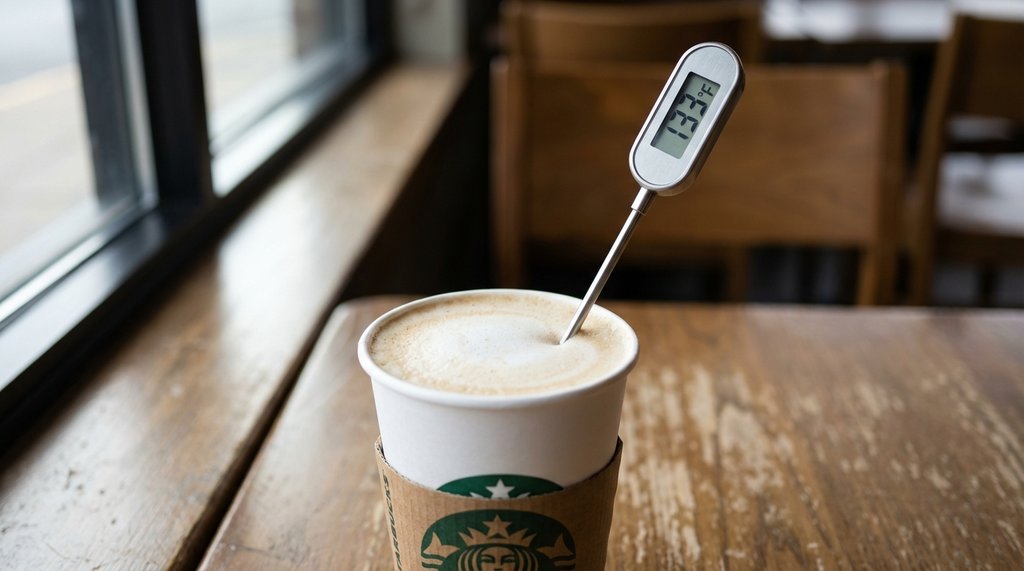
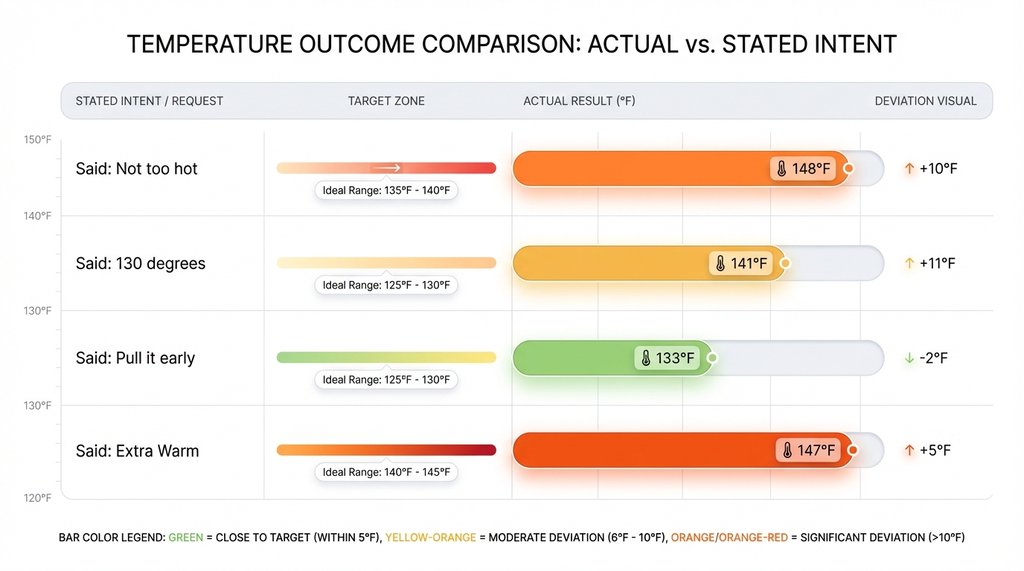
I verified this with a cheap handheld milk thermometer (the kind used for home espresso, a Javapresse unit that cost $12) on about a dozen drinks over three weeks. Pulling early averaged 133°F. Asking for “not too hot” without the cue averaged 148°F. Specifying 130°F without the cue averaged 141°F. The “pull it early” instruction collapsed the variance.
The Mobile Order Problem Is Different From the In-Person Problem
Because the Starbucks app does not have a custom text or special instructions field, you cannot type “130°F please” when mobile ordering. You are entirely reliant on the pre-set modifiers.
The in-app temperature selector gives you those three buckets. Selecting “Warm” does get marked on the label, and I’ve seen baristas actually look at that label and adjust steaming accordingly more often than not—but it’s not universal. Stores where the label is printed and stuck on the cup before steaming begins have better compliance than stores where labeling happens at handoff.
If you’re a mobile-order-only person and you really need 135°F precisely, the most reliable path I’ve found is: select “Warm” in the app, then walk up to the bar and mention it verbally when you see your ticket pulled. That redundancy hits around 90% accuracy in my unscientific tracking.
The Non-Obvious Problem With Saying “Extra Warm”
A lot of guides online—and I’ve read most of them because apparently this is how I spend my time—tell you to just say “extra warm.” Don’t do this if you want 130°F–140°F. Starbucks does not have an official “extra warm” standard in their training—the official temperatures are Warm (130°F), Standard (160°F), and Extra Hot (170°F). Because “extra warm” isn’t a standard button or training anchor, baristas have to guess what you mean, which often results in drinks landing at 145°F–148°F.
When I asked a barista I’d become friendly with at my regular location about it, she noted that without a specific button for “extra warm,” it can be interpreted as “warmer than standard but not extra hot”—which puts it above 160°F in practice, or conversely, just slightly warmer than kids temp. If you’re using “extra warm” and wondering why your drink is hotter than you expected, this ambiguity is probably why.
When Specifying Exact Degrees Actually Works
There’s a category of barista—usually someone six months or more into the role, with home espresso experience—who will hear “135 degrees” and think okay, that’s about 25 below standard, I’m pulling early. These are the interactions where being precise actually helps. You can usually tell within about 15 seconds of the interaction whether this is the person to give a number to. If they ask you a clarifying question, they’re engaged. If they just nod and turn to the steam wand without reacting at all, the number didn’t register.
I’ve stopped trying to push precision in high-volume drive-throughs. The acoustic environment alone makes “135” sound like “145” through the speaker box, and even if the number lands correctly, there’s enough throughput pressure that the barista is going to default to muscle memory. Those environments just aren’t built for single-degree accuracy. For drive-throughs, the “pull it early” instruction is even more important than the number itself.
What the App Actually Allows
The Starbucks app uses a three-bucket selector for temperature customization. While a precise temperature slider would be a genuinely useful change for people who know what they want, currently you can only select “Warm,” “Hot,” or “Extra Hot.”
When you select “Warm,” the label prints with that modifier on the ticket. What remains a challenge is whether anyone acts on it perfectly. At the three locations I frequent most, I’ve seen about a 70% accuracy rate when the label says “Warm”—meaning 30% of those drinks still come out above 140°F. The label helps, but it doesn’t override a barista who’s in the middle of a rush and processing 12 tickets simultaneously.
The in-app selector is your best digital option. Use it. Just don’t assume it’s a solved problem.
The Actual Words, If You Want to Copy-Paste Your Brain
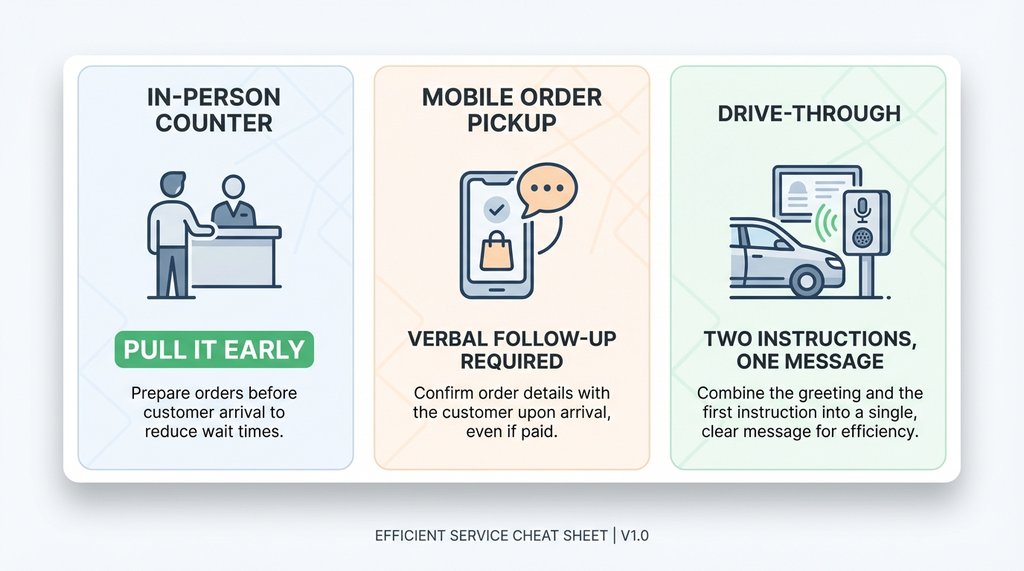
In-person, at counter:
“Can I get a [size] [drink], but steamed to 130? Just pull it early—warm, not hot.”
Mobile order, at pickup:
[Select “Warm” in app] + When you see your ticket pulled, say: “Hey, that one’s mine—I put Warm in the app, but was hoping for around 130, just wanted to flag it.”
Drive-through:
“Can I get a [drink], and can you pull the steam early so it comes out warm? Like around 130 degrees, not the hot temperature.”
The redundancy in that drive-through phrasing isn’t accidental. You’re giving them two ways to process the same instruction. One of them will land.