

My neck locked up on a Tuesday afternoon last February, somewhere around the third hour of a video call I was taking from my couch. The lift top was down. I had my laptop sitting flat on it, chin basically touching my chest the whole time. By 4pm I couldn’t turn my head left without a sharp pull running from C5 all the way into my left shoulder blade. Two days of heating pad and a chiropractor visit later, I started actually measuring things instead of just winging it.

Here’s what nobody tells you when they’re selling you on the “home office flexibility” pitch: a lift top coffee table, used wrong, is ergonomically worse than working from your actual floor. The surface sits somewhere between 16 and 20 inches off the ground depending on the model, and when you factor in couch seat height — typically 17 to 19 inches — your laptop screen ends up anywhere from 8 to 14 inches below eye level. That’s a forced cervical flexion angle of somewhere between 25 and 45 degrees depending on your torso length. For reference, every 10 degrees of forward head flexion adds roughly 10 pounds of effective load on your cervical spine. You’re not “working from the couch.” You’re stress-testing your neck with a slow-burn injury.
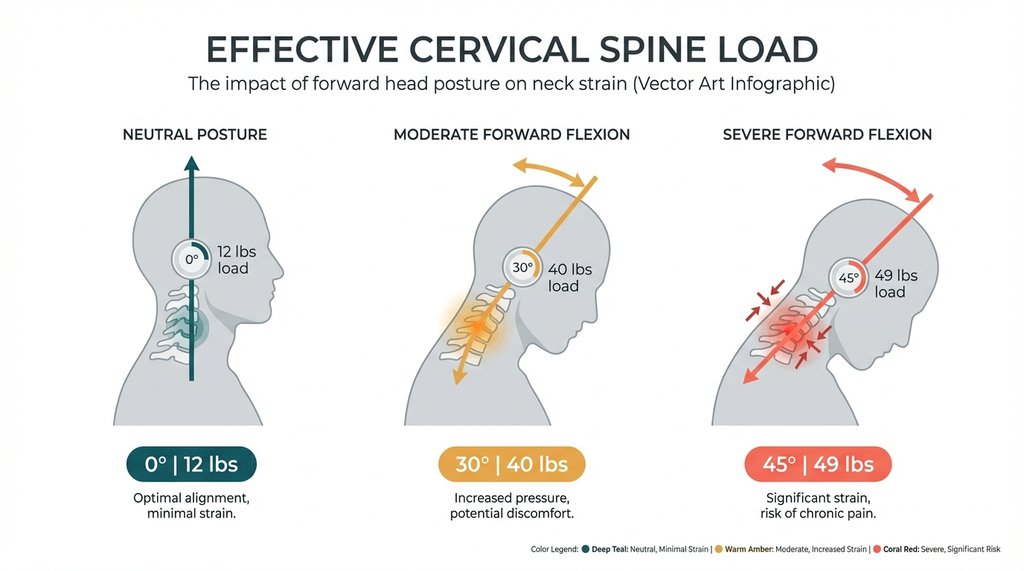
The fix isn’t just “raise the lift top and get a better posture.” That framing is where most people — and honestly most ergonomics articles — get it wrong.
The Lift Top Position Is Only Half the Problem
When I first started trying to correct this setup, I raised the platform to max height on my Prepac Belmont (lifts to about 26.5 inches) and propped my back against the cushions and thought I’d solved it. I hadn’t. The laptop screen still sat too low because I was still reading the display directly rather than having it at eye level. The difference between “not hunching” and “cervical neutral” is not the same thing, and collapsing those two concepts is the mistake that keeps people stuck.
What you actually need to solve simultaneously:
- Screen height relative to your seated eye level
- Keyboard/trackpad height relative to your elbow bend angle
- Lumbar support that keeps you from slowly sliding into a C-curve
Those three don’t get solved by the lift top alone. The lift top solves keyboard height. It does nothing for screen height unless you introduce a secondary riser.
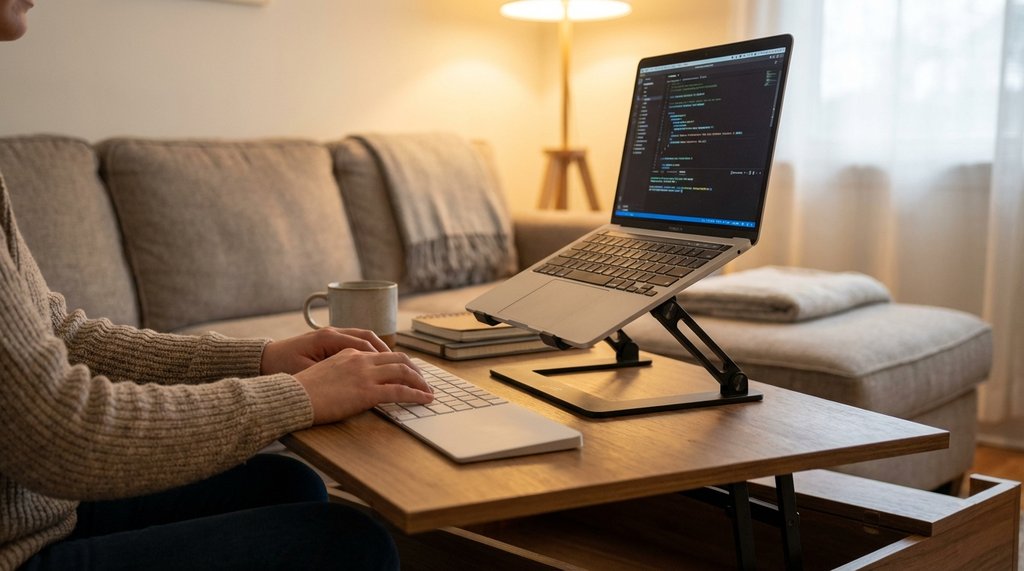
I spent about three weeks trying different combinations. The iteration that actually worked: lift top raised to sit about 2 inches below my natural elbow height when seated (roughly 24 inches for me on my particular couch), laptop on a compact riser that adds another 4 to 6 inches of screen elevation, and a separate Bluetooth keyboard/trackpad on the lift surface itself. This decouples screen from input device, which is the only real solution — the same principle that applies at a standing desk applies here.
The riser I landed on was the Nexstand K2 folded to its second-lowest notch. It’s light enough to not feel absurd sitting on a coffee table, and it doesn’t tip when you’re typing on a separate keyboard. I tried a solid-block acrylic riser first — the kind that looks clean in apartment photos — and it added too much height at the wrong angle for how far back the lift top sits from the couch. The laptop screen ended up too far away and at a slight upward tilt, which trades neck flexion for neck extension. Different problem, still a problem.
What I Got Wrong About Lumbar Support
The part I underestimated longest was the seat itself. My couch has a relatively soft cushion — not a deep sink-in sectional, but it’s not firm either. After 45 minutes of work, I’d slowly migrate from “sitting at 90 degrees” to “pelvis tilted back, spine in a C.” Once that happens, you’re extending your neck just to keep eyes level with the screen regardless of how well-positioned everything else is.
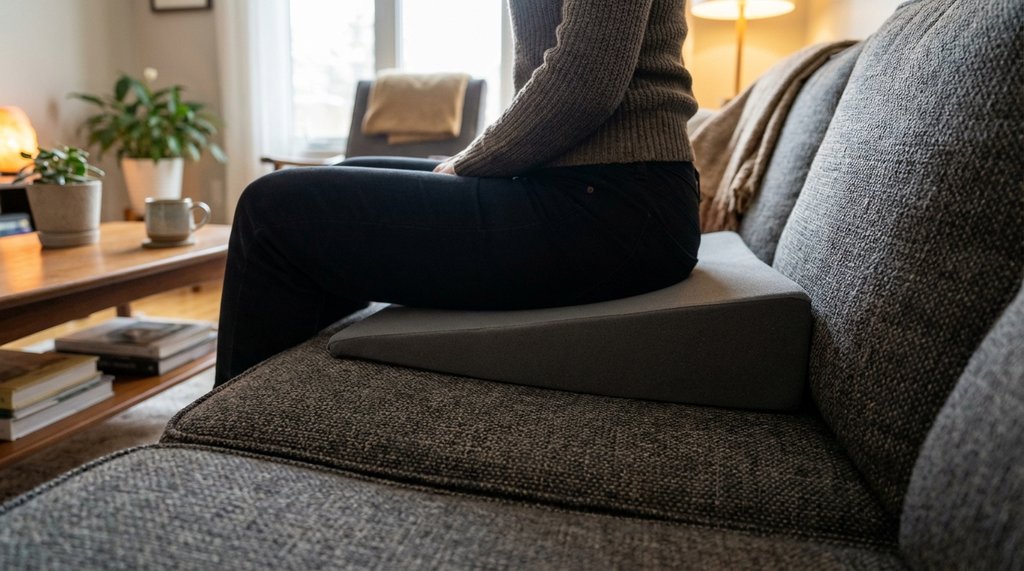
I tried a lumbar roll first. It helped for maybe 20 minutes before I shifted and it ended up behind my shoulder blades. What actually worked was a firm wedge cushion — I’m using a Purple seat cushion I had from a previous desk setup — placed on the couch seat itself, tilting my pelvis slightly forward. It’s not glamorous. It looks a little odd. But it adds enough anterior pelvic tilt that my lumbar curve holds without active effort, which means I’m not fighting my own spine to maintain position while I’m thinking about something else.
The non-consensus opinion here: a lot of WFH ergonomics advice tells you to find a couch with better back support or to add a dedicated lumbar pillow behind your lower back. In my experience, the posterior cushion approach fails faster than the seat wedge approach because couch backs aren’t flat — they have variable firmness zones, and the pillow migrates. The wedge stays put because your bodyweight holds it. If you’re going to invest in one thing for this setup, it’s the seat wedge, not the lumbar pillow.
Eye Distance and the Specific Number Most People Don’t Check
One thing I didn’t check until much later than I should have: horizontal distance from eye to screen.
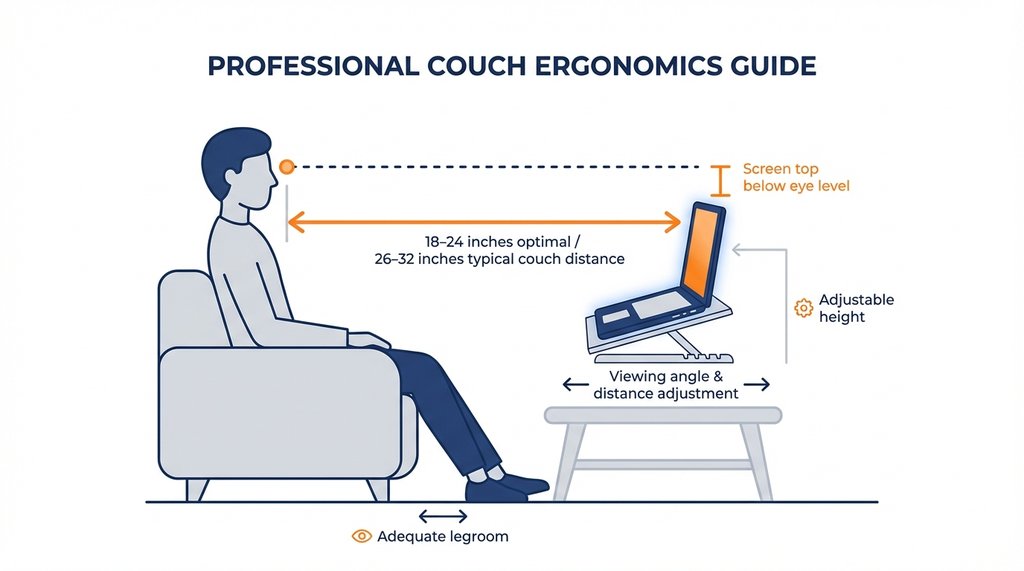
On a couch, you’re typically sitting 2 to 3 feet from the lift top surface. With a laptop riser in place, the screen face is probably somewhere around 26 to 32 inches from your eyes depending on couch depth. The generally cited optimal viewing distance for a 13 to 15 inch laptop display is between 18 and 24 inches. You’re already outside that range before you even consider the angles.
What this means practically: if you haven’t bumped your display font size up, you’re going to be squinting and unconsciously leaning forward, which collapses everything you just set up. I have my macOS display scaling set to “Larger Text”, and I bumped Chrome’s default zoom to 110%. The instinct to lean in because text looks small is extremely powerful and it will undo your ergonomic setup faster than almost anything else.
Check this: sit in your working position with your eyes closed, open them, and note where your gaze naturally falls. That’s your resting eye level. Your screen should be sitting so its top edge is at or just slightly below that line. The tendency is to center the screen at eye level, but that actually forces you to look slightly upward at the top of the display for a lot of your working time.
The 45-Minute Rule I Now Actually Follow
Every ergonomics resource mentions taking breaks. The ones that work actually specify mechanics.
What I do now: every 45 minutes, I close the lid, stand up, and do 10 seconds of chin tucks — not a stretch, a retraction. Basically the opposite motion of everything the laptop position asks your neck to do. It’s not a productivity disruption. It takes less time than the average Slack notification response. The key is that chin tuck motion specifically counters the forward head translation that builds up even in a well-positioned setup.
I also have a 20-minute rule for the lift top itself: after 20 continuous minutes of typing, I’ll rest my hands in my lap for at least 60 seconds before continuing. Typing on a surface at couch height — even at correct ergonomic positioning — puts slightly more ulnar deviation on the wrist than a proper desk setup, and the cumulative load adds up in longer sessions.
One Setup Combination That Actively Doesn’t Work
Wireless keyboard on the couch cushion next to you, laptop on riser on the lift top. I see this suggested in WFH subreddits somewhat regularly. The theory is that it keeps the keyboard at a comfortable height and lets the screen be elevated independently. In practice, typing on a cushioned surface has zero tactile resistance, your wrist position is unpredictable, and most people type with their keyboard tilted at whatever angle the cushion allows — which for standard couch cushions is usually a positive tilt, driving wrist extension. I used this setup for about six days before the right wrist fatigue was bad enough that I went back to diagnosing the problem from scratch.
The keyboard needs to be on a hard, stable, flat surface. That’s the lift top platform. The screen needs to be elevated off that same surface. Those constraints point directly to the laptop-on-riser-with-external-keyboard solution, and there’s really not a meaningful workaround to it if you want to use this setup for more than an occasional hour.
Quick Diagnostic You Can Do Right Now
Sit in your actual working position. Hold a finger horizontally at the bridge of your nose. Look straight ahead, naturally. Does the top edge of your laptop screen fall at or just slightly below that finger? If your screen top is at chin level or below, you already know the problem and you know which direction to move.
The lift top coffee table as a workstation isn’t a gimmick — I use mine for 4 to 5 hours on days I work from home, and my neck is fine. But the people selling the table are not ergonomists, and the marketing photos always show someone sitting in a position that would destroy their upper cervical spine in about an hour. Measure your actual eye level. Decouple screen from keyboard. Use a seat wedge. Those three things together are the difference between a usable setup and a slow-motion injury.